
Why Canva Resumes Fail ATS Screenings (Design vs. Parseability)
Eye-catching colors and two-column layouts look great to humans, but what happens when hiring bots try to read them?
Canva is one of the best tools in the world for presentations and social media graphics. For job applications, its resume templates are quietly one of the biggest obstacles a candidate can put in their own way.
Every month thousands of people spend hours building a colourful, photo-laden, two-column resume in Canva, send it to dozens of companies, and hear nothing back for weeks.
The reason is simple: the human eye and the parser see completely different documents.
Step-by-Step Walkthrough
Beware the Two-Column Layout Trap
Parsing FailureParsers read left-to-right across the entire page, interleaving your skills sidebar into your work history sentences.
Remove Skill Bars and Graphic Meters
Missing Data'Python: 4 out of 5 stars' is parsed as empty space, stripping your core competencies from the recruiter's search index.
Avoid Floating Text Box Misalignment
Layout CorruptionCanva arranges text boxes in creation order rather than visual hierarchy, scrambling chronological work dates.
Switch to Clean, Typographic Excellence
RecommendationTrue executive aesthetics come from clean typography and structured hierarchy, not decorative graphics.
// TABLE OF CONTENTS
- 01.1. What You See vs. What the Parser Reads
- 02.2. The Four Most Damaging Template Habits
- 03.3. The Alternative Is Not an Ugly Resume
- 04.4. "But My Friend Got a Job With a Canva Resume"
- 05.5. Recovering an Existing Design Resume
- 06.6. A Short Checklist Before You Trust Any Template
- 07.7. What to Do With the Design You Spent Hours On
1. What You See vs. What the Parser Reads
Open a polished Canva resume and you'll typically find:
- A dark sidebar on the left holding your photo, skill bars ("Python 90%") and interests.
- Work experience and education on the right.
How an ATS reads that file
A parser cannot see colours, shadows or background boxes. It sweeps the page left to right, line by line. The result:
"Senior Frontend Engineer – Python 90% – ABC Technology – Kadıköy, Istanbul – Swimming, Reading – 2021-2023 – Built React and Next.js."
Hobbies from the left column fuse with job titles from the right. Company names merge with skill bars. Faced with that text, the system concludes the candidate's experience cannot be determined and files the application away.
The inspection below shows how a multi-column document scrambles its own reading order during parsing:
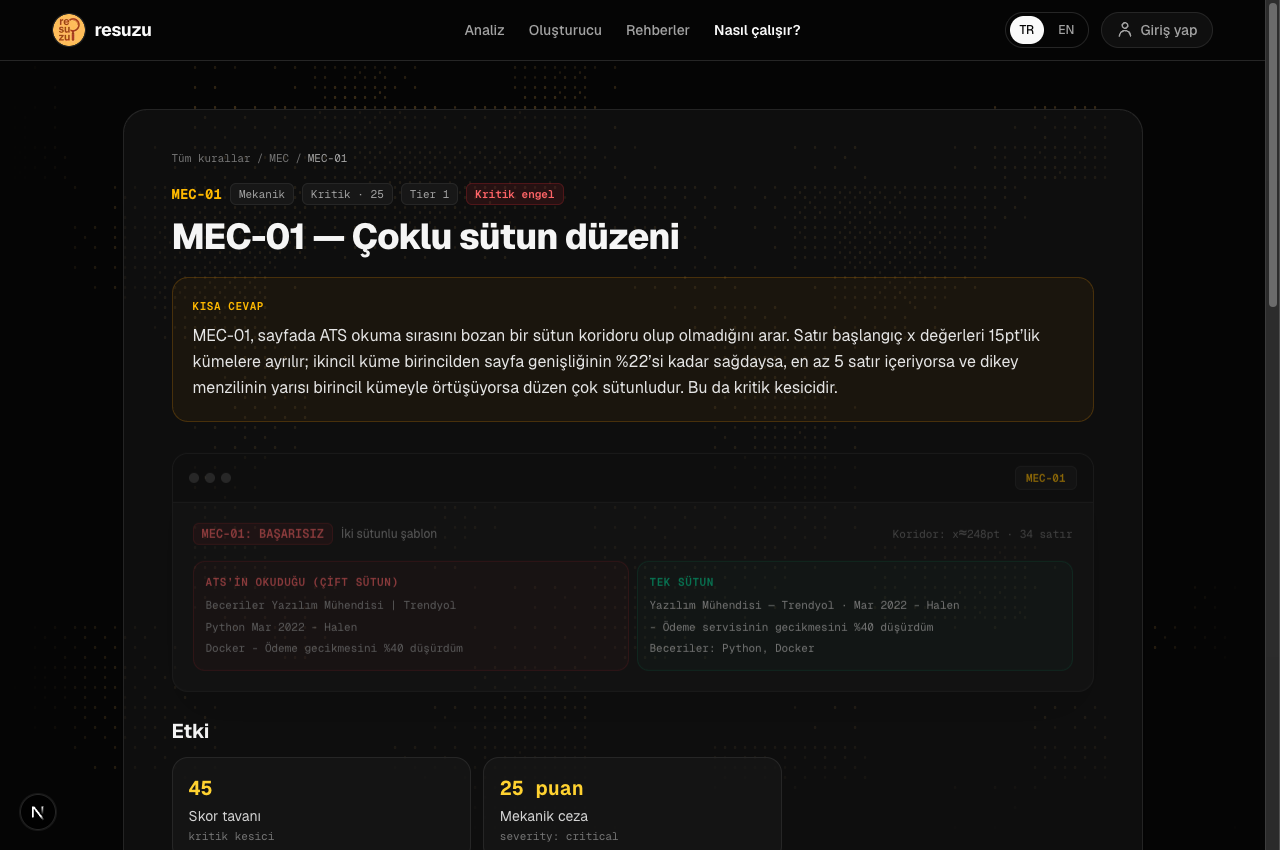
This is why MEC-01 is a hard blocker in Resuzu: a resume that trips it is capped at 45 points regardless of how strong its content is. No amount of keyword tuning compensates for a layout the parser cannot read.
2. The Four Most Damaging Template Habits
1. Charts and skill bars
"English: 4 out of 5 stars", "Excel: 75%". A parser sees an image or an undefined character, and the skill never reaches the database. Resuzu's MEC-04 flags these — including the corrupted symbol strings (ˆˆˆˆ‘‘) they turn into when the bar glyphs aren't embedded in the PDF.
2. Text box chaos
In Canva every text element is an independent box. On export, their order in the PDF follows the order they were created on the canvas, not the order they appear on the page. Your 2024 role can end up encoded beneath your 2018 internship.
3. Contact icons instead of labels
A small phone glyph instead of "Phone:" is obvious to a person and invisible to a parser. Worse, if those details sit in the document header, many systems never read that flow at all — which is exactly what MEC-05 checks.
4. Rasterised text and bloated files
Canva exports sometimes flatten the text layer into an image. The file balloons past 5 MB and the text can no longer be selected or copied — a direct MEC-00 failure, and the single most fatal outcome possible, because zero characters reach the system.
3. The Alternative Is Not an Ugly Resume
A professional resume does not need coloured tables to look considered. Real corporate polish comes from clean typography, consistent spacing and a clear information hierarchy — all of which survive parsing intact.
Every resume Resuzu generates:
- Uses a single-column, deterministically parsable hierarchy.
- Is rendered through React-PDF with a fully selectable text layer, and real link annotations rather than flattened URLs.
- Embeds its own fonts, so Turkish characters (ğ, ş, ı, İ) come out correctly instead of as corrupted glyphs.
You can verify this yourself: export a resume from the Builder and run it straight back through the Analyzer.
4. "But My Friend Got a Job With a Canva Resume"
This objection comes up constantly and it deserves a straight answer rather than a dismissal.
People do get hired with visually elaborate resumes. Three situations explain most of those cases.
The application never went through an ATS. Small companies, referrals and direct outreach often mean a human opens the file. A two-column layout parses badly and reads fine, so the failure mode never triggers.
The field expects a portfolio. Designers, illustrators and some marketing roles are evaluated partly on presentation. Even then, the standard advice inside those industries is to send a clean resume and a separate portfolio — not to merge the two.
The template happened to be single-column. Not every Canva template is a two-column sidebar design. A candidate who picked a plain one avoided the main failure without knowing it.
None of these make the layout safe in general. They describe the conditions under which the risk did not materialise. The relevant question is not whether anyone has ever succeeded with one, but what the cost is when it fails — and the cost is invisible, because a rejection caused by parsing looks identical to a rejection caused by qualifications.
5. Recovering an Existing Design Resume
If you already have a Canva, Figma or InDesign resume, you do not need to retype it.
Upload it to the analyzer. The parser maintains two separate views of a multi-column document: the text as an ATS would extract it — columns interleaved, which is what the mechanical rules measure and why the penalty stays honest — and a reconstructed reading order in which the columns have been separated and re-sequenced.
The second view is what the extraction uses. The reason is practical: the document may be broken for machines, but your data is still in there, and you should be able to get it out. Without that reconstruction, "build a resume from this" would return an empty form for exactly the documents that need rebuilding most.
So the flow is: upload the design resume, let the score tell you honestly how it would fare, then push the extracted content into the Builder and export a clean single-column version. You keep the content and lose only the layout that was costing you.
6. A Short Checklist Before You Trust Any Template
Whatever tool you use, five checks take two minutes and catch nearly everything.
- Select all the text in the exported PDF and paste it into a plain text editor. Read what comes out, in order. That text is your resume as far as any automated system is concerned.
- Confirm your email and phone number are in that paste. If they are missing, they were in a header or footer flow that many parsers ignore.
- Click every link. A URL that is styled blue and underlined but carries no annotation is a dead link, and a recruiter who cannot reach your portfolio in one click generally does not try a second way.
- Check the Turkish characters. ğ, ş, ı, İ, ö, ü, ç are the first glyphs to break when a font is not embedded. If they render as boxes or as the wrong letters in the paste, the font is substituted.
- Check the file size. A text resume has no reason to exceed roughly one megabyte. Five megabytes means images — and quite possibly that your text has been rasterised into one.
If all five pass, the layout is probably safe regardless of which tool produced it. If any fail, the design is costing you applications you will never hear about.
7. What to Do With the Design You Spent Hours On
The layout is not wasted work. It is simply in the wrong document.
Keep it as a portfolio cover page, a personal site, or the PDF you hand over in person at a career fair — contexts where a human is looking at it and no parser is involved. Send the single-column version to the application portal.
That split is what most professionals in design-adjacent fields already do, and it removes the trade-off entirely: the recruiter who wants to see that you can lay out a page still gets to, and the system that decides whether you reach that recruiter gets a file it can actually read.
Rules Referenced in This Guide
All 36 rules →Every rule has its own inspector card, evidence sample and fix steps.
Audit Your Canva Resume for Free
Upload your Canva PDF to Resuzu and see exactly what applicant tracking systems scramble or miss.
Frequently Asked Questions
Are Canva resumes ever appropriate to use?
Yes, when handing a printed copy directly at an in-person career fair or emailing a small studio owner directly. But when applying through any portal (Workday, LinkedIn, Greenhouse), Canva templates fail automated parsing.
Related Guides
View All →How to Build an ATS-Friendly Resume Step-by-Step (2026 Guide)
A comprehensive walkthrough on crafting a professional resume that passes automated Applicant Tracking Systems and impresses recruiters.
How ATS and Hiring AI Algorithms Work (Why 75% of Resumes Are Rejected)
Understand the automated filter between your application and the recruiter's desk. Insights from Harvard Business School research on recruiting software.
How to Read Your Resume Analysis Report (Decoding Rule Codes & Warnings)
A step-by-step walkthrough for interpreting Resuzu audit reports, prioritizing hard blockers, and understanding ASO bullet scores.