
How to Build an ATS-Friendly Resume Step-by-Step (2026 Guide)
A comprehensive walkthrough on crafting a professional resume that passes automated Applicant Tracking Systems and impresses recruiters.
In modern hiring, having a resume that merely looks pleasant to human eyes is no longer enough. Before any recruiter sees your profile, automated algorithms screen, parse, and score your document.
If your document has broken column layouts, text boxes, or unparseable graphics, your application gets discarded automatically.
This guide breaks down exactly how to build an ATS-compliant, high-scoring resume from scratch.
Step-by-Step Walkthrough
Define Target Industry and Seniority
FoundationStart by aligning your structure with your industry (Software, Marketing, Finance) and level (Junior, Mid, Senior).
Structure Clean Contact & Header Details
ContactInclude full name, title, email, phone, location (City, Country), and clean links to LinkedIn/GitHub.
Write Experience Bullets Using the ASO/STAR Method
Most CriticalTransform generic tasks into high-impact bullets with Action Verbs, Scale/Metrics, and Business Outcomes.
Categorize Skills Logically
KeywordsGroup technical competencies into Languages, Frameworks, Developer Tools, and Methodologies instead of a raw dump.
List Education and Certifications
EducationAdd your degrees, institutions, graduation dates, and recognized credentials.
Export as a Single-Column ATS-Safe PDF
ExportExport clean vector text that automated parsers can extract without character corruption.
// TABLE OF CONTENTS
1. Why ATS Systems Reject Applications
When a single job posting attracts 250 to 500 applicants, recruiters rely on automated filters. The system performs three primary steps:
- Parsing: Extracting raw characters from your PDF/DOCX.
- Sectionizing: Mapping headers to Contact, Experience, Education, and Skills.
- Keyword Matching & Ranking: Calculating relevance against job requirements.
If the file lacks a clean text layer or scrambles two-column text, the parser outputs gibberish and disqualifies the candidate.
2. Formatting Experience Bullets (The ASO Rule)
The biggest differentiator in your resume is bullet point quality. Follow the Action - Scale - Outcome (ASO) formula:
- ❌ Weak: "Worked on the company website and added new features."
- ✅ Strong: "Architected a customer checkout flow using Next.js and Tailwind CSS, reducing page latency by 40% and lowering cart abandonment by 12%."
3. Build Your Resume with Resuzu
Resuzu enforces mechanical parsing rules and modern recruiting standards out of the box:
Step 1: Select Your Industry
Choose your target field. Resuzu customizes field definitions and industry-specific rules automatically:
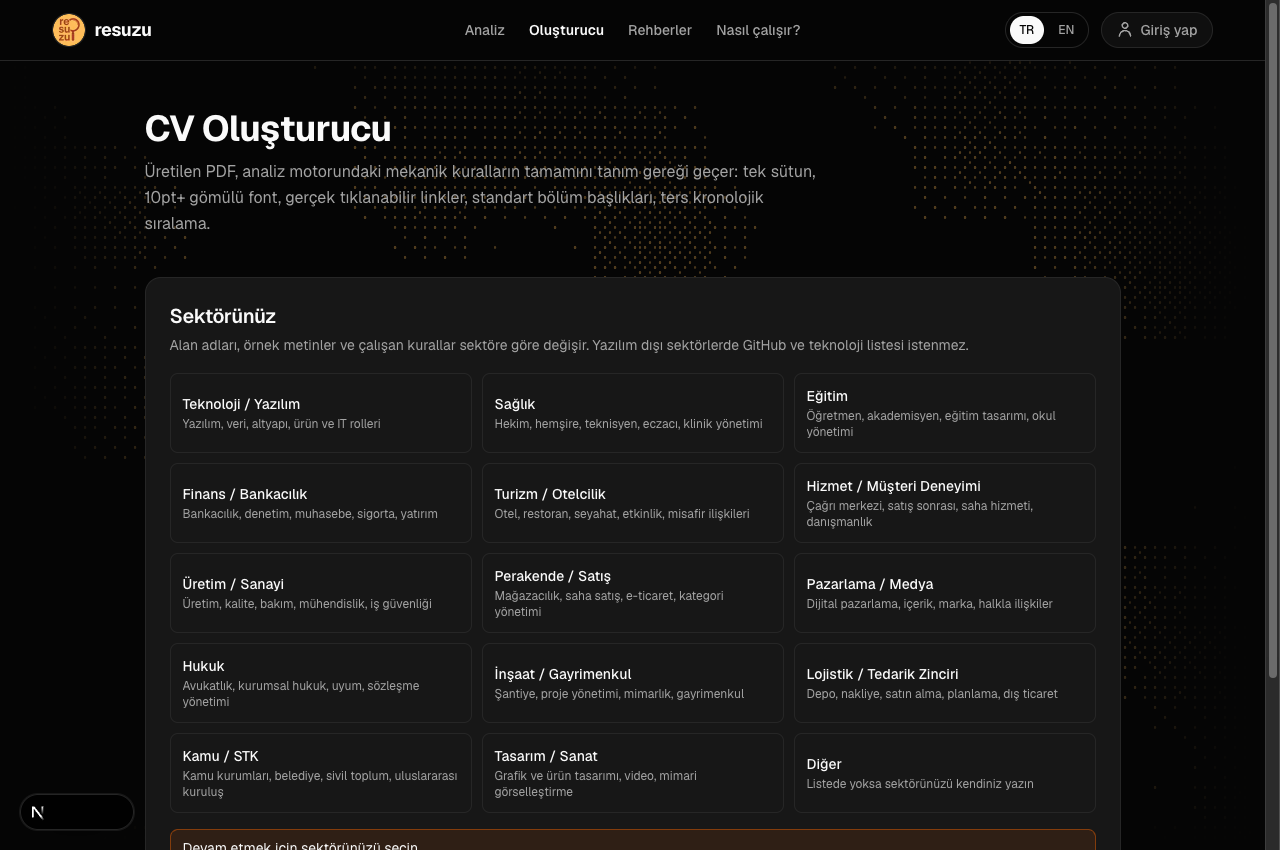
Step 2: Configure Seniority and Fill Sections
Set your experience level (Junior, Mid, Senior) and populate work history with live guidance:
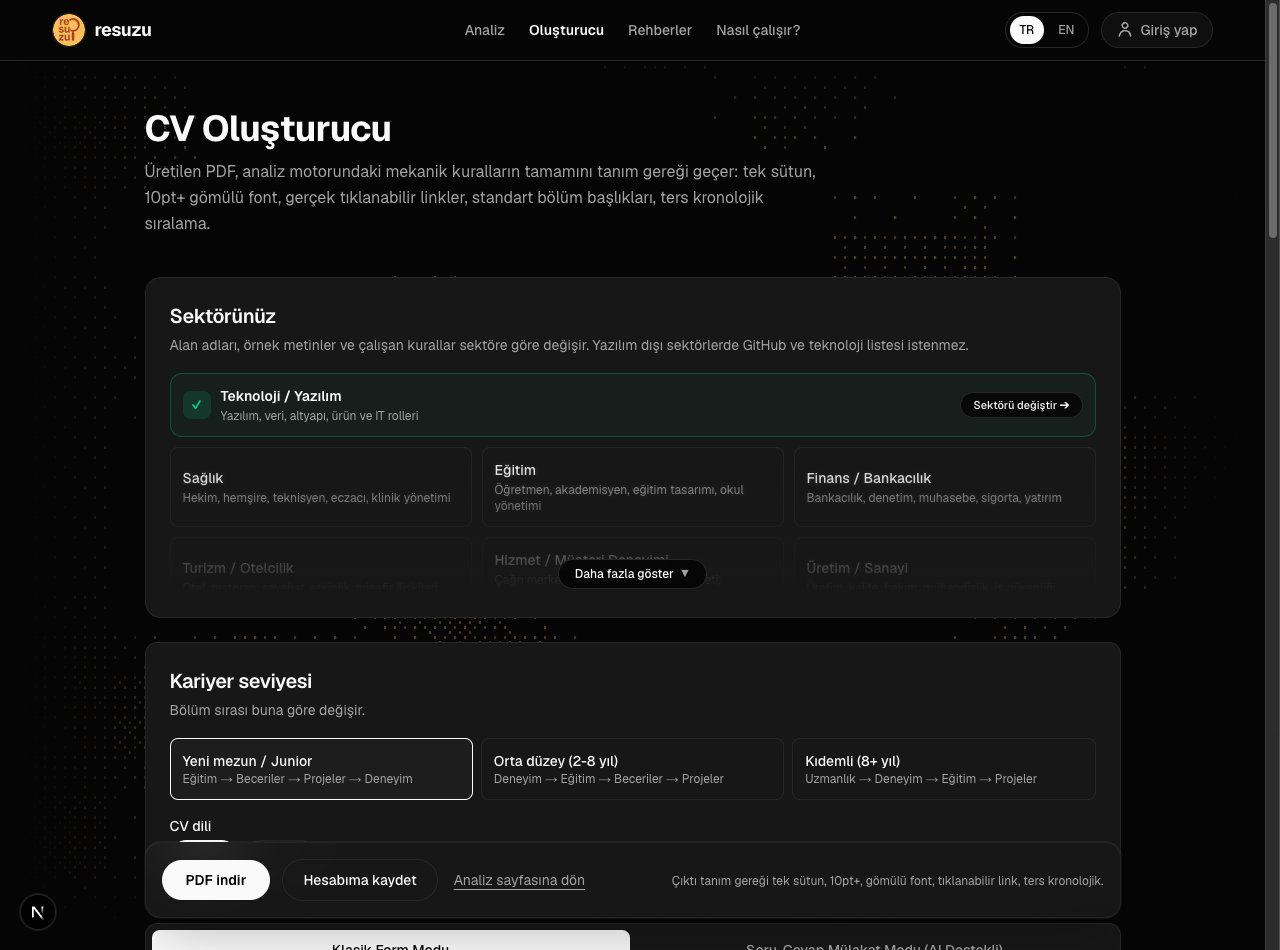
Step 3: Export Clean ATS-Compliant PDF
With a single click, export a single-column, cleanly parsed vector PDF ready for top tier company portals.
4. The Mechanical Rules, Concretely
"ATS-friendly" is treated as a vibe in most advice. It is not. It is a short list of measurable properties, and Resuzu turns each one into a rule with a score impact. Getting these right is worth more than any template purchase.
A real text layer (MEC-00). If you exported your resume as an image, or scanned a printed copy, there are no characters in the file — only pixels. Some parsers run OCR, most do not, and the ones that do introduce errors. Test: open the PDF and try to select a line of text with your cursor. If nothing highlights, no system can read it.
One column (MEC-01). This is the single most common fatal flaw. A parser reads a PDF the way the text was laid down, not the way your eye follows it. A two-column layout with skills on the left and experience on the right frequently extracts as alternating fragments: a skill, a job title, another skill, half a date. The resulting text is unrecoverable, and the candidate never learns why.
Standard, embedded fonts (MEC-02). Stick to widely available families — Arial, Calibri, Helvetica, Georgia, Roboto, Lato. A decorative font that is not embedded renders as substituted glyphs; non-Latin characters are the first to break.
10pt or larger body text (MEC-03). Shrinking type to 8.5pt to force one page is a false economy. It signals cramming to a human reader and, in several parsers, small type in tight line spacing merges adjacent lines.
No progress bars, rating dots, or icon fonts (MEC-04). "React ●●●●○" carries no information a parser can index, and the bars themselves frequently extract as strings of corrupted symbols that pollute your skills section.
Contact details in the body, not the header (MEC-05). Many parsers ignore the header and footer regions of a PDF entirely. An email address that lives only in the page header can vanish — and an application record with no email address is invalid in most systems. Put your contact block in the normal flow, at the top of page one.
Conventional section headings (CON-01). "Where I've Been" is charming and unparseable. Use "Experience" / "Work Experience", "Education", "Skills", "Projects". The sectionizer matches against a dictionary; a creative heading means the content underneath is never assigned to a section at all.
One date format throughout (CON-05). Mixing "03/2023 – Present" with "March 2023 – Now" and "2023–" in the same document makes chronology unreliable. Pick one pattern and apply it to every entry, including education.
5. What Each Section Should Actually Contain
Contact block. Full name, target title, email, phone, city and country, and links written as real clickable URLs. Do not include date of birth, marital status, national ID number, or a full street address — these are irrelevant in most markets and actively harmful in markets with anti-discrimination rules.
Professional summary. Two to four lines, 25 to 90 words. This is the only place on the resume where you get to frame yourself, and the overwhelming majority of candidates waste it on adjectives. Write evidence: years, domain, the scale you operate at, and one result. "Backend engineer, 5 years, payments. Scaled a Go/PostgreSQL service handling 40M requests/day; cut p99 latency from 320ms to 90ms." That paragraph does more work than any list of traits.
Experience. Reverse chronological, always. Each entry needs a company, a title, and a date range — Resuzu's GEN-04 fires when any of the three is missing, because a recruiter cannot evaluate a role they cannot place in time. Three to five bullets for recent roles, one or two for older ones.
Skills. Grouped, not dumped. "Languages: Go, Python, TypeScript / Databases: PostgreSQL, Redis / Infrastructure: Docker, Kubernetes, AWS" is scannable in two seconds. A single 40-item comma list is not, and it triggers the keyword-stuffing rule.
Education. Institution, degree, field, graduation year. Add GPA only if it is strong and you are early-career. Relevant coursework belongs here only if you have little work history to show.
Projects. For career changers, new graduates, and anyone whose employment history does not demonstrate the skill they are hiring for, this section carries more weight than experience. Each project needs a one-line description of what it does, the stack, and — critically — an outcome or a usage figure.
6. Tailoring Without Keyword Stuffing
Generic resumes lose to tailored ones, but the common fix is worse than the problem. Pasting the job description's keyword list into a "Skills" block, or hiding white text behind your margins, is detectable and gets applications discarded.
The version that works is narrower: read the posting, identify the five requirements that carry the most weight, and check whether your existing bullets evidence them. Where they do, adjust the vocabulary to match the posting's terms — if they say "stakeholder management" and you wrote "worked with business teams", use their phrase. Where they do not, that is a real gap, and claiming it will surface in the first technical screen.
Resuzu's CON-10 measures this overlap directly, and SKL-01 flags the overcorrection. The gap between those two rules is the honest tailoring zone.
7. Before You Send It
Run this checklist on the final file, every time:
- Select all the text in the PDF and paste it into a plain text editor. Read what comes out. That is what the ATS sees. If the order is scrambled or characters are corrupted, fix the layout before anything else.
- Confirm your email and phone survive that paste.
- Click every link. A LinkedIn URL that is styled as a link but carries no annotation is a dead link (CON-02), and a URL typed as plain text is not clickable at all.
- Name the file
firstname-lastname-resume.pdf.cv_final_v3_son.pdfis a small thing, but it is the first thing a recruiter sees in their download folder (MEC-07). - Run the audit. A resume built in the Resuzu builder passes every mechanical rule by construction; a resume built elsewhere usually has two or three findings worth twenty points between them.
Rules Referenced in This Guide
All 36 rules →Every rule has its own inspector card, evidence sample and fix steps.
Build Your ATS Resume for Free
Stop struggling with broken templates. Build a clean, deterministic, ATS-compliant resume with Resuzu in minutes.
Frequently Asked Questions
What is an ATS and why does it matter?
An Applicant Tracking System (ATS) is recruitment software that parses, indexes, and ranks resumes before a human recruiter reviews them. Over 98% of Fortune 500 companies use an ATS.
Should my resume be one page?
For candidates with 0 to 5 years of experience, a single-page resume is the gold standard. For 10+ years of deep senior experience, two pages are acceptable.
Should I include a headshot photo?
In the US, UK, and most global markets, resumes should NOT have photos due to anti-discrimination regulations. Single-column text-focused resumes always perform best.
Related Guides
View All →Why Canva Resumes Fail ATS Screenings (Design vs. Parseability)
Eye-catching colors and two-column layouts look great to humans, but what happens when hiring bots try to read them?
How ATS and Hiring AI Algorithms Work (Why 75% of Resumes Are Rejected)
Understand the automated filter between your application and the recruiter's desk. Insights from Harvard Business School research on recruiting software.
How to Boost Your Resume ATS Score from 60 to 90+ (Proven ASO Formula)
Transform a mediocre resume into an elite application using Google's X-Y-Z principle and the Action-Scale-Outcome (ASO) methodology.