
How to Read Your Resume Analysis Report (Decoding Rule Codes & Warnings)
A step-by-step walkthrough for interpreting Resuzu audit reports, prioritizing hard blockers, and understanding ASO bullet scores.
The first time you run a resume through Resuzu Analyzer you get a wall of rule codes (MEC-00, CON-04, ASO-03), coloured bars and percentages. It looks like a lot.
Think of it the way you would think about compiler output: it tells you exactly where the problem is and exactly how to fix it. This guide walks through every part of the results screen and the order you should work through it.
Step-by-Step Walkthrough
Resolve Red Hard Blockers First
Priority 1Red alerts represent critical disqualifiers (MEC-00 unscannable text, MEC-01 multi-column layout) that cause parsers to abort.
Check Mechanical Formatting (MEC Rules)
FormattingReview margins, font sizes, dead hyperlinks, and character encoding issues.
Inspect Section & Skill Rules (CON & SKL)
ContentEnsure complete contact info, proper chronological ordering, and structured skill groupings.
Boost Action-Scale-Outcome (ASO) Scores
QualityExamine how effectively your experience bullets demonstrate quantifiable impact.
// TABLE OF CONTENTS
1. Reading the Overall Score
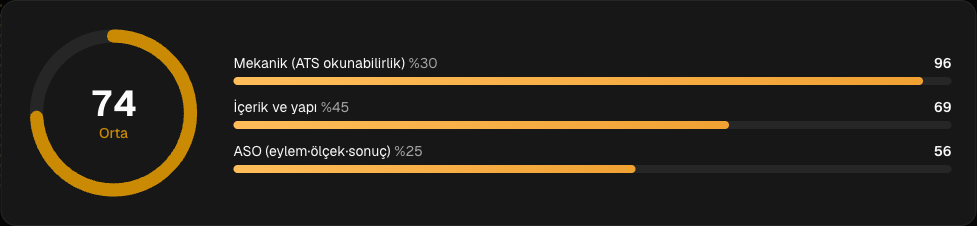
The large circular gauge at the top represents the overall ATS health of your document:
- 0–39 (Critical): The file is very likely unreadable — scanned images instead of text, or a multi-column layout that scrambles every section.
- 40–59 (At Risk): Parsable, but with serious structural problems or bullets made entirely of abstract statements.
- 60–74 (Needs Work): The parser succeeds, but metrics are missing, keywords are thin, or formatting is inconsistent.
- 75–89 (Good): Clears most ATS filters and reads well to a recruiter.
- 90–100 (Excellent): Top tier for both machine parsing and human review.
Two things are worth knowing about this number. First, it is deterministic — the same file always scores the same, so any change you see came from your edit, not from randomness. Second, a handful of rules are hard blockers: if MEC-00, MEC-01 or GIT-04 fails, the score is capped at 45 no matter how strong the rest of the document is.
2. The Three Sub-Scores
The final score is a weighted blend, and the panel shows each part separately:
- Mechanical (30%) — can the file be read at all?
- Content (45%) — are the sections, dates and structure correct?
- ASO (25%) — how strong are the experience bullets?
Rules that cannot be evaluated for your file type are skipped, not passed. A skipped rule is excluded from the calculation entirely, so a DOCX and a PDF of the same resume produce the same score.
3. What the Rule Families Mean
MEC — Mechanics and file structure
The physical readability of the document. MEC-00 checks that real text exists rather than a scanned image. MEC-01 detects multi-column layouts. MEC-02 and MEC-03 cover font family and minimum font size. MEC-04 catches progress bars, rating graphics and icon junk. MEC-05 flags contact details that live only in the header or footer, where many parsers never look. MEC-06 covers page count and density, MEC-07 the file name.
CON — Content and sectioning
Whether the building blocks are in place and machine-readable: standard section headings, complete contact fields, consistent date formats, a real professional summary, working links (CON-02 catches dead or flattened URLs), and no personal data that shouldn't be there (CON-03).
SKL and GEN — Skills and general structure
Whether competencies are grouped into meaningful categories rather than dumped as one long line, and whether sections appear in reverse-chronological order and in a sequence that suits your seniority.
ASO — Action, Scale, Outcome
The deepest layer, scoring every experience bullet on whether it opens with a strong verb, states a measurable scale, and names a concrete outcome.
4. Fixing in the Right Order
- Clear the red items first. Click any failed rule to see the exact excerpt from your resume that triggered it. Fixing a single column layout can move the score by 20 points on its own.
Your resume preview sits on the left, the finding cards on the right. Selecting a card highlights the exact line in the preview that triggered the rule, so you never have to guess which part of the document a code refers to:
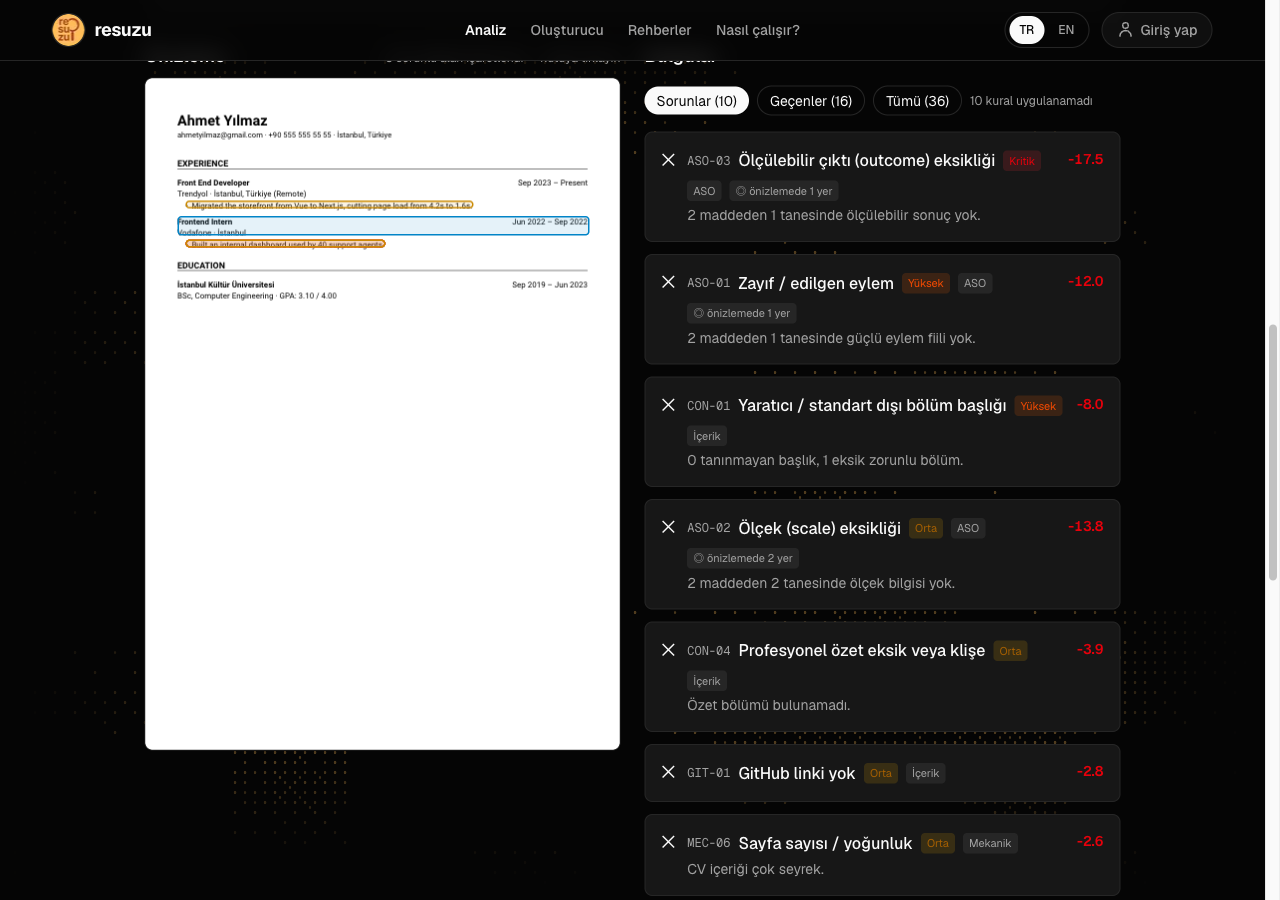
- Then the amber ones. These are usually missing numbers — add a percentage, a headcount or a timeframe to each bullet.
- Send it to the Builder. The "Build a resume from this" button carries everything the parser extracted straight into the editor, so you can fix problems against live feedback instead of editing a file and re-uploading it.
5. Evidence, Anchors and Why They Matter
Every finding card carries an evidence excerpt — a literal quotation from your document, not a summary. That design choice is not cosmetic. Because the evidence is verbatim, the engine can locate it again in the parsed lines and draw a box around it in the preview. A meta-statement like "3 unrecognised headings" reads fine but cannot be pointed at, so it would leave you hunting.
Some rules know their own coordinates and return the box directly: MEC-01 outlines the detected second column, MEC-03 marks the runs below the minimum size, MEC-05 highlights the header region holding your contact details. Everything else is mapped back by matching its evidence text to the line it came from.
If a card shows an excerpt you do not recognise, that is itself useful information — it usually means the parser read something different from what you see on screen, which is the root problem rather than the rule that reported it.
6. Skipped Is Not Passed
A rule can come back in three states: passed, failed, or skipped. The third one is the one people misread.
A skipped rule is one that could not be evaluated on your file. DOCX files carry no glyph coordinates, so column geometry rules that depend on them cannot run. A rule marked skipped is removed from the denominator entirely — it does not silently count as a pass and it does not quietly cost you points.
This matters because of a bug the project spent real effort on. Skipped rules used to be scored as zero-impact passes, which meant the same content scored 80 as a DOCX and 70 as a PDF: the file format was changing the score. The fix was two-sided — normalise the denominator, and read the missing signals directly out of the DOCX XML (font sizes, theme fonts, section columns, header and footer flows) so fewer rules need skipping in the first place. The measured PDF-DOCX gap is now zero, and a parity check verifies it on every run.
Practically: upload whichever format you are actually going to send. The score will not flatter one over the other.
7. A Sensible Working Order
Findings are sorted by score impact, and that is usually the right order — but not always. This sequence wastes the least time:
First, anything capping your score. If a hard blocker fired, everything else is noise until it is cleared. There is no point polishing bullets on a document nobody can read.
Second, the mechanical failures. Font, size, contact placement, graphics, file name. These are quick, unambiguous edits and they are worth up to thirty points between them.
Third, structure. Headings, dates, section order, links, personal data. Still mostly mechanical work, and the largest single block of the score.
Fourth, the bullets. This is the slow part and the part that carries into the interview. Work on the specific bullets the ASO findings name rather than rewriting the whole section.
Then re-run. Because scoring is deterministic, a re-run after an edit tells you precisely what that edit was worth. If the number did not move, the change did not address what the rule was measuring — read the evidence again rather than editing further.
8. Saving a Run and Comparing Over Time
Signed-in users can save an analysis to their account. The saved record holds the sub-scores, the failed rules and the parsed structure — and, if you ran the AI evaluation, that output too.
Two uses make this worth doing. The first is comparison: keeping the run from before a rewrite lets you see exactly which rules a session of editing actually cleared, rather than relying on the impression that the document "reads better now". The second is recovery. The parsed structure can be pushed straight into the Builder from the saved record, which means a resume you analysed months ago can become a new draft without re-uploading anything.
What is not saved is the file itself. Uploaded PDFs and DOCX files are processed in memory and never written to disk or to the database — only the structured summary persists, and only if you ask for it.
Rules Referenced in This Guide
All 36 rules →Every rule has its own inspector card, evidence sample and fix steps.
Get Your Full Resume Audit
Upload your CV and receive an instant report detailing mechanical flaws, content gaps, and measurable metric improvements.
Frequently Asked Questions
What is a passing ATS score?
A score of 80+ is strong; 90+ puts your application in the top 5% of candidate submissions.
Related Guides
View All →How to Boost Your Resume ATS Score from 60 to 90+ (Proven ASO Formula)
Transform a mediocre resume into an elite application using Google's X-Y-Z principle and the Action-Scale-Outcome (ASO) methodology.
How to Build an ATS-Friendly Resume Step-by-Step (2026 Guide)
A comprehensive walkthrough on crafting a professional resume that passes automated Applicant Tracking Systems and impresses recruiters.
Why Canva Resumes Fail ATS Screenings (Design vs. Parseability)
Eye-catching colors and two-column layouts look great to humans, but what happens when hiring bots try to read them?